You step out of Atocha station, bags in hand, and you need to pull up the metro map and message your hotel. Madrid has free Wi-Fi in more places than most visitors expect, but a lot of it is patchy, slow, or only good for loading one web page before it times out. Knowing what actually works saves you standing on a pavement corner refreshing your phone.
Free internet is available at the main squares in the centre, inside every major museum, on every city bus, and at the bigger train stations. For a quick Google Maps search or a WhatsApp message, it does the job. For anything beyond that, you want your own connection sorted before you fly.
Which option is right for you?
Best for most
eSIM
Buy online before you leave home, activate on the plane, and you have 4G the second you land at Barajas. Works on most phones from 2018 onwards. You do not need to swap a physical SIM or find a phone shop at the airport.
How it worksNo cost
Public Wi-Fi
Free at the main squares (Sol, Plaza Mayor, Callao), inside all three Paseo del Arte museums, on every EMT bus, and at major train stations. Good for quick lookups, not for streaming.
Where to connectFree while seated
Café & Mall Wi-Fi
Nearly every café and shopping centre in Madrid shares the Wi-Fi password when you order. Usually faster than the public networks, but you are sitting down. Good for downloading offline maps before heading out.
Best spotseSIM for Madrid: Buy Before You Land
An eSIM is a digital SIM card built into your phone. Instead of swapping a physical card, you scan a QR code, the plan downloads in minutes, and you switch to it when you need it. Your regular number stays active alongside it.
For Madrid, a Spain and Europe eSIM gives you 4G coverage from the moment your plane touches down at Adolfo Suárez Madrid-Barajas Airport. Set it up the evening before you fly. When you land, it just works.
Is my phone compatible? Most smartphones bought from 2018 onwards support eSIM: iPhone XS and later, Google Pixel 3 and later, Samsung Galaxy S20 and later. Check under Settings > Mobile Data (or Connections). If you see an option to add a data plan, your phone supports it.
Where to find free Wi-Fi in Madrid
The free Wi-Fi is at the main squares, inside the big museums, on public transport, and in a handful of cultural buildings. At most spots you just turn on Wi-Fi, pick the network, and tap "accept." No password needed.
Public squares with outdoor Wi-Fi
Four squares near Sol and Gran Vía have free outdoor Wi-Fi, and they are all within a 10-minute walk of each other:
- Puerta del Sol – the main metro hub. Grab a bench, connect, and figure out your next move.
- Plaza Mayor – Wi-Fi covers the entire square. The Tourist Information Centre inside the arcade (entrance 27) has an indoor connection too, with air conditioning and free city maps.
- Plaza de Callao – top of Gran Vía. A few minutes on foot from Sol one way and Malasaña the other.
- Plaza de Santo Domingo – has had public Wi-Fi since 2007, before most cities even thought about it. Quiet square just north of Gran Vía.
Museums and cultural centres
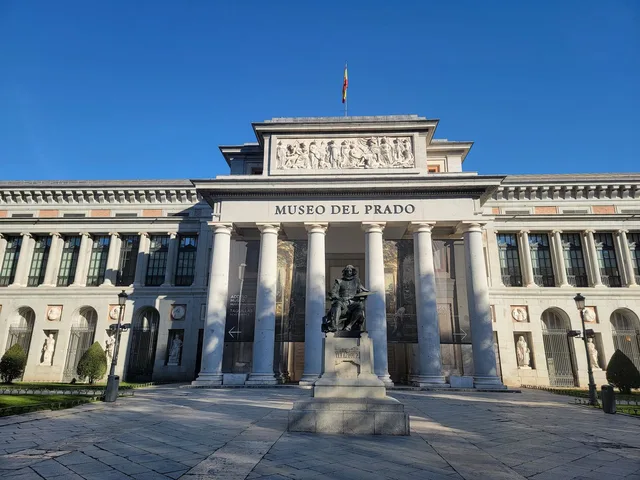
The museums along the Paseo del Arte all have free Wi-Fi inside, which is useful while you wait in the ticket line or need to message your group.
- Museo del Prado
- Museo Reina Sofía
- Museo Thyssen-Bornemisza (works in the ground-floor café too)
- Museum of San Isidro on Plaza de San Andrés – free admission, free Wi-Fi, right in La Latina
- Museum of History on Calle de Fuencarral – also free admission, near Tribunal metro
Two cultural centres are worth knowing about if you need to sit somewhere comfortable for a while:
- CentroCentro in the Palacio de Cibeles on Plaza de Cibeles. Free Wi-Fi, seating, air conditioning, international newspapers. You do not need a ticket to walk in. It is right between the Prado and Retiro Park.
- Conde Duque on Calle del Conde Duque, 11, near Plaza de España. Free Wi-Fi inside the old military barracks (now a cultural centre).
Parks
Wi-Fi in parks only works in specific spots, not across the whole park:
- Retiro Park – the Cecilio Rodríguez Gardens and Casa de Vacas cultural centre both have Wi-Fi. Sessions may be time-restricted.
- Madrid Río Park – free Wi-Fi along parts of the riverbank walkway. Time-restricted sessions.
- Plaza de Olavide (Chamberí) – technically a square, but it feels like a neighbourhood park. Surrounded by terrace cafés that also share their passwords.
Libraries
If you need to actually get work done, the public libraries have fast Wi-Fi, power sockets at every table, and nobody kicks you out after 30 minutes.
- National Library on Paseo de Recoletos, 20. Wide tables, fast connection, no library card needed. Open Monday to Saturday. Easy walk from Retiro or Cibeles.
- Joaquín Leguina Regional Library near Méndez Álvaro. Modern, air-conditioned, and usually quiet.
Madrid Barajas Airport Wi-Fi
All terminals have free Wi-Fi. Look for the network called Airport Free WiFi Aena, open your browser, type in your email, and accept the terms. There is no time limit, but the speed is capped.
T4 and T4S have the best coverage. T1, T2, and T3 cover the boarding areas and food courts but can be spotty in between. If you set up an eSIM before your trip, you do not need the airport Wi-Fi at all.
Wi-Fi on public transport
Every single city bus in Madrid has free Wi-Fi. You can look up directions or check messages while riding between attractions instead of only when you stop.
EMT City Buses
All 2,000+ buses. No registration, no password. Select the bus network when you board. Good for messaging, maps, and browsing.
Renfe Cercanías Stations
Free Wi-Fi at Sol, Atocha, Nuevos Ministerios, Príncipe Pío, Méndez Álvaro, and Getafe Centro. 30-minute sessions.
Metro Interchange Hubs
Five major stations: Moncloa, Plaza de Castilla, Plaza Elíptica, Príncipe Pío, and Avenida de América. Both Metro Ligero Oeste lines too.
High-speed trains: Iryo offers free Wi-Fi on board. Ouigo also has Wi-Fi, though it is a paid add-on at booking. If you are travelling from Barcelona to Madrid by train, both services keep you connected the entire journey.
Cafés, Shopping Centres, and Chains
Ask for the Wi-Fi password when you order. That is it. Nearly every café in Madrid hands it over without a second thought. Starbucks and similar chains have open networks you can use without asking. The specialty coffee places in Malasaña, Chueca, and La Latina do not mind if you sit with a laptop for a couple of hours.
Shopping centres with free Wi-Fi include La Vaguada, Plaza Río 2, Príncipe Pío, ABC Serrano, and Las Rozas Village. Most ask for an email the first time you connect.
Local tip
La Bicicleta and Toma Café in Malasaña are both laptop-friendly with fast connections and a relaxed atmosphere. In Chamberí, Café Federal near Plaza de Olavide is another solid option. Order a café con leche, download your offline maps, and you are sorted for the rest of the day.
Staying safe on public Wi-Fi
Public Wi-Fi networks are not encrypted, so anyone on the same network can potentially see what you are doing if the site does not use HTTPS. Worth keeping in mind:
- Use a VPN for anything sensitive on a public network
- Avoid banking apps or entering card details on open connections
- On Windows, select "public network" when prompted after connecting
- Stick to sites with HTTPS (padlock icon) for anything that requires a login
With an eSIM you are on your own private 4G connection, so none of this applies. One more thing: keep your phone physically secure. Pickpocketing is real in Sol, Plaza Mayor, and on crowded metro cars. Front pocket or zipped bag, always.
Frequently Asked Questions
Where can I get free Wi-Fi in Madrid?
Free outdoor Wi-Fi is available at major public squares including Plaza Mayor, Puerta del Sol, Callao, and Plaza de Santo Domingo. Museums along the Paseo del Arte (Prado, Reina Sofía, Thyssen) offer free Wi-Fi inside. All 2,000+ EMT city buses have free internet, and five major metro interchange stations provide coverage. Nearly every café and restaurant shares its password with customers.
How do I connect to Wi-Fi at Madrid Barajas Airport?
Select "Airport Free WiFi Aena" from your device's wireless network list, open your browser, enter your email on the sign-in page, and accept the terms. All terminals have coverage with no time limit. Speed is limited for standard users.
What is the best way to get internet in Madrid as a tourist?
An eSIM. Buy it before you leave home, activate it on the plane, and you have 4G the moment you land. Free Wi-Fi at the squares, museums, and on buses covers quick lookups, but for anything more than that you want your own data.
Does my phone support eSIM?
Most smartphones bought from 2018 onwards support eSIM: iPhone XS and later, Google Pixel 3 and later, Samsung Galaxy S20 and later. Check under Settings > Mobile Data (or Connections). If you see an option to add a data plan, your phone supports it.
Is there free Wi-Fi on Madrid buses?
Yes. All 2,000+ EMT city buses in Madrid have free Wi-Fi. Select the bus network when you board. Speed is fine for messaging and maps. No registration or password needed.
Is it safe to use public Wi-Fi in Madrid?
Public Wi-Fi networks are unencrypted, so skip banking apps and card details on open connections. Use a VPN for anything sensitive. If you have an eSIM or mobile data, none of this applies since you are on your own connection.